
Satellite Network Brownout Explained: Why Links Degrade Before They Fail Completely
What satellite network brownout means, how it differs from outage, what causes service degradation, and how engineers detect, diagnose, and reduce brownout risk.
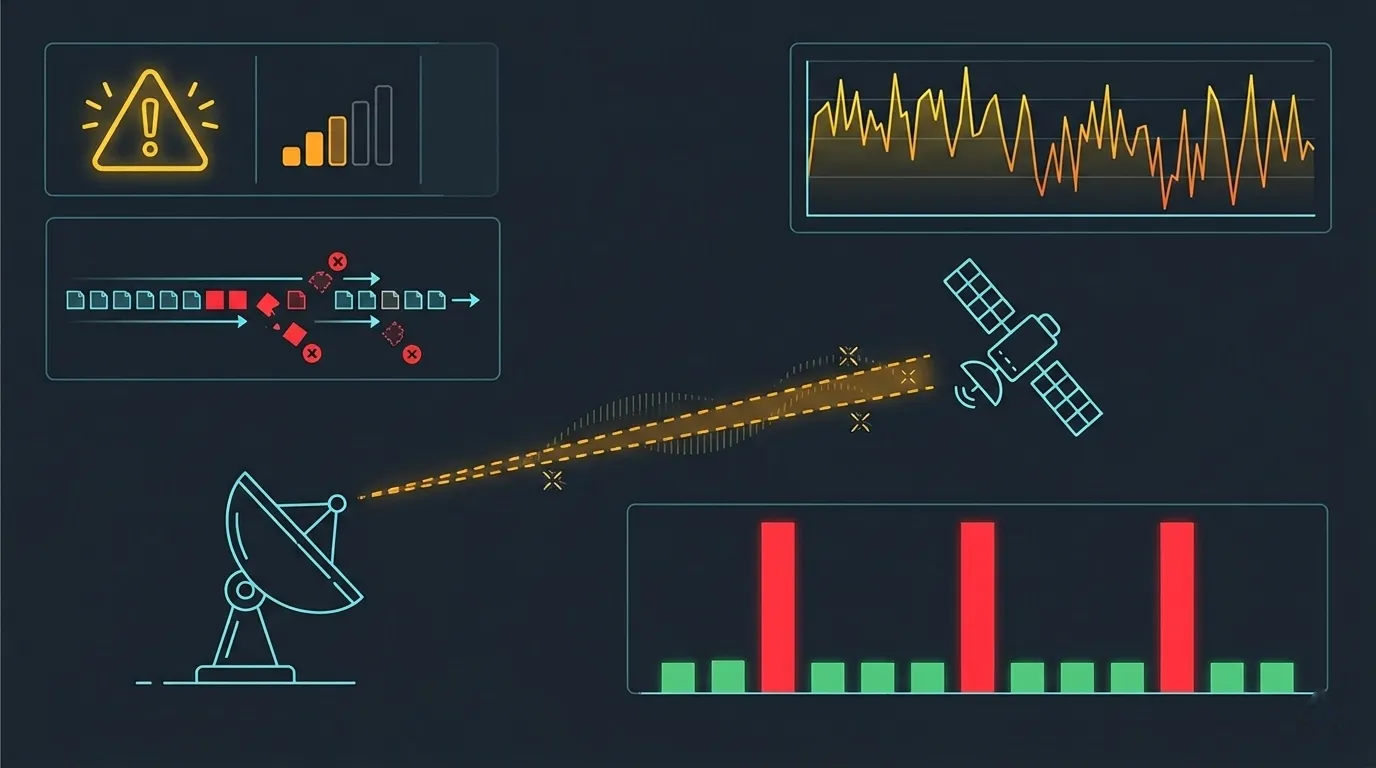
Satellite users rarely experience an instant transition from perfect service to total failure. More often, there is an intermediate state: throughput drops, latency climbs, voice calls stutter, video freezes, and web pages take forever to load — yet the link remains technically connected. Users report "the internet is down," but the modem shows a healthy link. Support teams check the dashboard and see a connected terminal with green status lights.
This intermediate state has a name: brownout. It is a distinct operational condition — not normal service, not a full outage, but a degraded-but-connected state that requires its own diagnosis, its own response, and its own design considerations. Understanding brownout as a concept helps operations teams communicate faster, escalate more effectively, and design networks that degrade gracefully rather than catastrophically.
This article defines brownout in satellite communications, explains what causes it, describes how it manifests to users and operators, and provides practical guidance for detection, troubleshooting, and risk reduction.
Key terms used in this article — For complete definitions, see the Glossary M–R.
- Brownout: A state where a satellite link remains connected but performance has degraded below operational thresholds.
- CIR (Committed Information Rate): The guaranteed minimum throughput a service provider commits to delivering.
- MIR (Maximum Information Rate): The peak throughput available when network capacity permits, above the CIR.
- C/N (Carrier-to-Noise ratio): The ratio of received carrier power to noise power, expressed in dB.
- ACM (Adaptive Coding and Modulation): Dynamic adjustment of modulation and coding to match real-time link conditions.
What Is a Brownout?
A brownout is a state where a satellite link remains connected — Layer 2 is up, the modem is synchronized, and IP traffic can flow — but performance has degraded below the thresholds required for normal application operation. Throughput drops well below contracted rates, latency increases beyond acceptable bounds, packet loss rises to levels that break real-time applications, and users experience the service as unusable or severely impaired.
Brownout is distinct from two other states:
- Normal operation: The link performs within specification. Throughput meets or exceeds CIR, latency is within expected bounds, packet loss is negligible, and applications function correctly.
- Outage: The link is down. Layer 2 connectivity is lost, traffic cannot flow, and the modem reports no signal or no synchronization.
Brownout sits between these two states. The link is technically alive, which means it does not trigger the hard alarms that an outage would. But performance is so degraded that the service is effectively unusable for some or all applications. This ambiguity is what makes brownout operationally challenging — it does not announce itself with a clear alarm, yet users are experiencing real impact.
The term matters because it gives engineering and operations teams a shared vocabulary. Instead of vague reports like "the link is slow" or "something is wrong but it is not down," brownout provides a specific label for a recognizable condition. This enables faster escalation, clearer communication with service providers, and more targeted troubleshooting.
What Causes Brownouts in Satellite Networks?
Brownouts arise from six broad categories of causes. Each produces a similar user experience — degraded service on a connected link — but requires different diagnosis and response.
1. Congestion and Oversubscription
When demand on a shared satellite carrier exceeds the available capacity, all users on that carrier experience reduced throughput. The link remains connected and each terminal maintains synchronization, but the throughput each user receives drops — sometimes dramatically during busy hours. Terminals configured with a low CIR and high MIR are especially vulnerable: the guaranteed rate may be too low for applications, and burst capacity disappears when everyone is competing for it.
For a detailed treatment of how contention ratios affect service quality, see Satellite Contention Ratio Explained.
2. Rain Fade and Reduced Modulation/Coding
When rain attenuates the satellite signal, systems using Adaptive Coding and Modulation (ACM) respond by shifting to lower-order modulations that require less signal-to-noise ratio. This keeps the link alive — connectivity is maintained — but at a significantly reduced data rate. A terminal that delivers 20 Mbps in clear sky might drop to 3 Mbps during moderate rain. The link never goes down, but the throughput reduction is severe enough to break bandwidth-dependent applications.
3. Gateway or Backhaul Constraints
The satellite link may be performing perfectly, but a bottleneck at the teleport — congested backhaul to the internet, an overloaded gateway processor, or a routing issue in the terrestrial network — can throttle all traffic passing through that gateway. From the user's perspective, the symptoms are identical to a satellite-side problem: slow throughput, high latency, timeouts. But the cause is entirely terrestrial.
4. Interference Events
Adjacent satellite interference (ASI), cross-polarization interference, or terrestrial interference raise the noise floor of the receiving system. The carrier-to-noise ratio (C/N) drops, which may trigger ACM downshift or increase the bit error rate. The link stays connected but quality degrades. Interference-induced brownouts can be intermittent and difficult to diagnose because the interference source may not be constant.
For interference causes and diagnosis, see Satellite Interference Explained.
5. Partial Equipment Degradation
Equipment does not always fail suddenly. A BUC losing output power gradually, an LNB with increasing noise figure, a coaxial cable developing water ingress, or an antenna slowly drifting off-point — all produce a slow decline in link quality. The link remains connected but operates with reduced margin, and any additional stress (light rain, minor interference) pushes it into brownout.
6. Routing or Control-Plane Issues
Not all brownouts have an RF cause. BGP route flaps, DHCP address exhaustion, DNS resolution failures, or firewall policy changes at the platform level can degrade or disrupt specific traffic flows while the underlying satellite link remains healthy. These issues can be particularly confusing because modem-level metrics show a perfectly normal link while users experience severe service degradation.
How Brownouts Appear to Users
Users experiencing a brownout rarely describe it in technical terms. What they report is a collection of symptoms that together paint a picture of degraded-but-connected service:
Slow throughput — Web pages load slowly or time out. File downloads stall or progress at a fraction of the expected speed. Cloud applications become unresponsive. Speed tests return results far below the contracted rate.
Increased latency and jitter — Real-time applications suffer most visibly. Voice calls develop echo, delay, or choppy audio. Video conferences freeze, pixelate, or disconnect. Interactive sessions (remote desktop, SSH) become sluggish and unresponsive. For a detailed treatment of jitter's impact on real-time applications, see Satellite Jitter Explained.
Higher packet loss — TCP connections experience retransmissions, reducing effective throughput further. UDP-based applications (VoIP, video streaming) show artifacts, drops, and quality degradation. VPN tunnels may reset or fail to maintain state. For the technical chain from bit errors to packet loss, see BER, FER, and Packet Loss in Satellite Explained.
Application instability despite "link up" — VPN tunnels drop and reconnect. VoIP calls disconnect after a few minutes. Web-based applications show timeout errors. Email clients fail to sync. Yet the modem dashboard shows the link is connected and IP addresses are assigned.
The hallmark of brownout is this disconnect between infrastructure status and user experience. The link is up, the modem is green, the terminal is synchronized — but the service is not usable. This is what makes brownout distinct from outage and what makes it frustrating for both users and support teams.
Brownout vs Outage
Understanding the differences between brownout and outage is essential for correct diagnosis and response. The two conditions look different, behave differently, and require different troubleshooting approaches.
| Aspect | Brownout | Outage |
|---|---|---|
| Link status | Connected (Layer 2 up) | Disconnected |
| Throughput | Reduced (often significantly) | Zero |
| Latency | Elevated and variable | N/A (no connectivity) |
| Packet loss | Elevated (1–15%+) | 100% |
| User perception | "Slow and unreliable" | "Completely down" |
| Operator visibility | Metrics show degradation | Alarm: link down |
| Diagnosis approach | Metric analysis, trending | Alarm response, hardware check |
| Typical duration | Minutes to hours | Until fault is resolved |
| SLA classification | May or may not trigger SLA | Usually counts as downtime |
Why diagnosis differs: An outage triggers clear, unambiguous alarms — link down, no signal, modem not synchronized. The response is straightforward: check equipment, check signal, escalate if the problem is on the satellite or hub side. A brownout generates no such clear alarm. The link is up, metrics are within some bounds but outside others, and determining the root cause requires trend analysis, correlation of multiple metrics, and often comparison against baseline performance.
The SLA gray zone: Some service level agreements define minimum performance thresholds — for example, minimum throughput, maximum latency, or maximum packet loss — below which degraded service counts as downtime even though the link is technically connected. Whether a brownout triggers SLA remedies depends entirely on how the SLA is written. For SLA structure and measurement approaches, see Satellite SLA Explained.
Brownout in Real SATCOM Environments
Scenario 1: Shared Broadband Service — Busy-Hour Congestion
A remote community in Papua shares a 10 Mbps Ku-band carrier among 80 subscribers with a 20:1 contention ratio. During morning and evening busy hours, aggregate demand exceeds the carrier capacity. Each subscriber's throughput drops to a few hundred kbps. Web pages time out, video streaming buffers endlessly, and voice calls break up. The satellite link is healthy — C/N is normal, no weather impairment — but the service is in brownout because the demand exceeds supply.
Scenario 2: Enterprise Remote Site — Rain Event with ACM
An oil and gas operation in West Africa uses a Ka-band VSAT for corporate WAN connectivity. A moderate rain event causes the terminal's ACM to downshift from 16APSK to QPSK. The CIR of 2 Mbps is maintained, but the MIR burst capacity that the site relies on for file transfers and video conferencing disappears. SAP transactions complete slowly, video calls fail, and file uploads to the central server stall. The link never drops, but applications that depend on burst capacity are effectively broken.
Scenario 3: Maritime Connectivity — Degraded Tracking
A cargo vessel transits through a rain cell in the South China Sea. The stabilized Ku-band antenna maintains tracking but with reduced accuracy due to heavy seas. C/N drops by 3–4 dB — not enough to break the link, but enough to trigger ACM downshifts and increase packet loss to 3–5%. Crew welfare internet becomes unusable, operational emails queue but do not send, and the ECDIS weather update fails to download. The master reports "no internet" while the NMS shows the terminal connected.
Scenario 4: Temporary/Disaster Recovery Network — Marginal Link Budget
A humanitarian organization deploys a flyaway terminal for disaster response. The terminal is set up quickly with approximate antenna pointing, resulting in a 2 dB pointing loss. The link budget closes in clear sky with only 1.5 dB of remaining margin. Any weather event — even light drizzle — pushes the link into brownout. The terminal connects and works acceptably in clear conditions but becomes unreliable whenever cloud cover increases.
How Engineers Detect and Troubleshoot Brownouts
Detecting a brownout requires monitoring and correlating multiple metrics simultaneously. No single metric defines a brownout — it is the combination of connected status with degraded performance that characterizes the condition.
Key Metrics to Monitor
- C/N₀ and Es/N₀: RF signal quality. If these are dropping, the problem is on the RF side — weather, interference, or equipment degradation.
- BER (pre-FEC and post-FEC): Error rates before and after forward error correction. Rising pre-FEC BER with stable post-FEC BER indicates the link is consuming margin. Rising post-FEC BER means errors are reaching the IP layer.
- Throughput vs CIR: Actual throughput compared to the committed rate. If throughput is below CIR, there is a problem. If it is above CIR but below MIR, it may be contention.
- Latency baseline deviation: Compare current latency against the established normal baseline. Satellite latency has a well-defined baseline (typically 550–650 ms round-trip for GEO); significant deviations indicate congestion, processing delays, or routing issues.
- Packet loss rate: Even 1–2% packet loss significantly impacts TCP throughput and real-time application quality.
Distinguishing RF Degradation from Congestion
This is the critical diagnostic branch point:
- If C/N is dropping while throughput degrades, the problem is RF: weather, interference, equipment, or antenna pointing. The solution involves the RF chain, the satellite operator, or waiting for weather to clear.
- If C/N is normal but throughput is low, the problem is congestion, backhaul, or platform-level: oversubscription, gateway bottleneck, routing issue, or application-layer problem. The solution involves capacity management, backhaul investigation, or platform troubleshooting.
Why Application Symptoms Alone Are Not Enough
"VoIP is breaking" does not tell you whether the cause is RF degradation, congestion, QoS misconfiguration, or a backhaul failure. Each cause requires a different response. Effective brownout troubleshooting requires correlating application symptoms with link-layer and RF-layer metrics to identify the actual root cause.
For the broader context of availability design and monitoring, see Satellite Link Availability Explained.
How to Reduce Brownout Risk
Brownout cannot be eliminated entirely — satellite links operate through a variable atmosphere and share finite capacity. But the frequency, severity, and impact of brownout events can be significantly reduced through proper design and operational practices.
Better capacity planning — Right-size the CIR to actual application requirements rather than relying heavily on burst/MIR capacity. If critical applications need 4 Mbps to function, the CIR should be at least 4 Mbps. Over-reliance on burst capacity is the most common cause of congestion-driven brownouts.
QoS and traffic prioritization — Configure Quality of Service policies that protect critical traffic during periods of reduced capacity. When throughput drops, QoS ensures that voice, SCADA, and business-critical applications receive their required bandwidth while lower-priority traffic (updates, backups, web browsing) is deprioritized. For QoS configuration approaches, see QoS over Satellite: Traffic Shaping.
Diversity and redundancy — Dual-feed antennas reduce the risk of equipment-related brownouts. Backup terminals or secondary links (cellular, secondary satellite) provide failover when the primary link degrades. Gateway diversity protects against weather-related brownouts at the teleport.
Proper SLA design — Define brownout thresholds in the service level agreement. Instead of only measuring "link up/down," include minimum throughput, maximum latency, and maximum packet loss thresholds. This ensures that degraded service triggers remedies before it reaches total outage. For SLA design guidance, see Satellite SLA Explained.
Performance baselining and monitoring — Establish normal-state metrics for each terminal: typical C/N, throughput, latency, and packet loss under clear-sky, uncontested conditions. Configure alerts on deviations from baseline, not just hard thresholds. Trend-based alerting catches gradual degradation (equipment aging, slowly increasing contention) before it reaches brownout levels.
Common Misunderstandings
"Every brownout is a hardware failure"
Most brownouts are caused by congestion, weather, or interference — not equipment failure. A terminal with perfectly healthy hardware can experience severe brownout during busy-hour congestion or a rain event. Jumping to "replace the equipment" without checking contention levels, weather data, and interference reports wastes time and money.
"Link up means healthy service"
Layer 2 connectivity does not guarantee usable performance. A satellite link can be fully synchronized, show a valid IP address, and pass some traffic while simultaneously experiencing 10% packet loss and 2,000 ms latency. Monitoring only link status misses the entire brownout category — the link is "up" but the service is not functional.
"RF-layer and network-layer causes are the same thing"
RF degradation (weather, interference, equipment aging) and network-layer degradation (congestion, backhaul bottleneck, routing issues) produce similar user symptoms but have fundamentally different causes and fixes. RF problems require antenna, equipment, or operator intervention. Network-layer problems require capacity management, routing changes, or backhaul upgrades. Conflating the two leads to misdiagnosis and delayed resolution.
Frequently Asked Questions
What is a satellite network brownout?
A satellite network brownout is a state where the satellite link remains connected but performance has degraded below usable thresholds. Throughput drops significantly, latency increases, packet loss rises, and applications malfunction — even though the modem shows a connected link. It is the intermediate state between normal operation and full outage.
How is a brownout different from an outage?
An outage means the link is down — no connectivity, no traffic flow, 100% packet loss. A brownout means the link is up but degraded — connectivity exists but performance is too poor for normal application operation. Outages trigger clear alarms; brownouts require metric analysis to detect and diagnose.
Can rain fade cause a brownout before a full outage?
Yes, and this is one of the most common brownout scenarios. As rain increases, ACM systems downshift to lower modulations to maintain connectivity. Throughput drops progressively — from full speed to half speed to a fraction of normal — while the link stays connected. Only if the rain exceeds the entire ACM range does the link actually drop. The brownout phase can last much longer than the outage phase.
How do operators diagnose a satellite brownout?
Operators correlate multiple metrics: RF signal quality (C/N₀, Es/N₀), error rates (BER pre-FEC and post-FEC), throughput compared to CIR, latency deviation from baseline, and packet loss rate. The key diagnostic step is distinguishing RF-layer degradation (dropping C/N) from network-layer degradation (normal C/N but reduced throughput), because the causes and remedies are different.
Does QoS help during brownout conditions?
Yes, QoS is one of the most effective brownout mitigations. When total capacity is reduced — whether from weather, congestion, or equipment degradation — QoS ensures that the remaining capacity is allocated to the most critical traffic. Voice, SCADA, and business applications continue to function while lower-priority traffic is throttled or dropped.
Can a brownout affect only some applications while others work?
Yes. Applications have different sensitivity to throughput reduction, latency, and packet loss. Email and basic web browsing may still function during a brownout while VoIP, video conferencing, and VPN tunnels fail. Applications that tolerate latency and retransmissions survive longer than those requiring consistent bandwidth and low jitter.
How long do satellite brownouts typically last?
Duration varies by cause. Weather-related brownouts may last minutes to a few hours (the duration of the rain event). Congestion-driven brownouts follow usage patterns — busy hours, specific times of day or week. Equipment-degradation brownouts are persistent and worsen over time until the equipment is serviced. Interference-related brownouts can be intermittent, lasting anywhere from minutes to days depending on the interference source.
Should SLAs include brownout thresholds?
Yes. An SLA that only measures "link up/down" misses the entire brownout category — periods where the link is technically connected but service is unusable. Well-designed SLAs include minimum throughput, maximum latency, and maximum packet loss thresholds. Service that falls below these thresholds for sustained periods should trigger the same remedies as downtime.
Key Takeaways
- Brownout is a distinct operational state — the link is connected but performance is below usable thresholds. It is not normal service, and it is not an outage. Recognizing it as a separate condition enables faster diagnosis and clearer communication.
- Six cause categories drive brownouts: congestion/oversubscription, rain fade with ACM downshift, gateway/backhaul constraints, interference, equipment degradation, and routing/control-plane issues.
- The diagnostic branch point is C/N: if C/N is dropping, the problem is RF (weather, interference, equipment). If C/N is normal, the problem is network-layer (congestion, backhaul, routing).
- "Link up" does not mean "service healthy" — monitoring only connectivity status misses the entire brownout category. Effective monitoring requires throughput, latency, packet loss, and RF metrics compared against baselines.
- QoS is the primary operational mitigation — when capacity is reduced, QoS ensures critical applications survive while lower-priority traffic absorbs the impact.
- SLAs should define brownout thresholds — minimum throughput, maximum latency, and maximum packet loss parameters ensure that degraded service triggers remedies before reaching total outage.
- Proper capacity planning prevents the most common brownouts — right-sizing CIR to actual demand rather than relying on burst capacity eliminates congestion-driven brownouts during busy hours.
Author

Organizational byline for SATCOM Index technical content. A named technical reviewer appears separately only when identity, scope, and permission are verified.
Categories
More Posts

Terminals & Remotes
User terminal equipment, remote site configurations, and installation guidelines.
Carrier-in-Carrier Satellite Links: How CnC Actually Works
Calculate Carrier-in-Carrier satellite bandwidth savings, then verify modem compatibility, transparent-payload loopback, power ratios, commissioning, and ROI.
Remote Site Network Monitoring Over Satellite | Practical Operations Guide
Practical guide to monitoring remote sites over satellite — architecture, KPIs, alerting design, troubleshooting, and bandwidth-efficient strategies for NOC teams managing VSAT networks.